
Posting to the Storage broker
How do I make a call?
Each broker call is formulated the same way. Every call has the same body consisting of a dispatch and a payload. The dispatch is the instructions and the payload is the data.
Dispatch
The dispatch consists of 2 parts: the entity and the operation
Entity: Where do I want my data to go?The entity is mapped to a specific table, index, or topic based on your configuration and the operation given. For example, if my entity was merchant_account and the given operation was Search, this call would look for the ElasticSearch index associated to merchant_account.
Operation: What am I doing with this data?There are 3 operations you can do with the broker: create, read, search. There is also update and delete, but it mimics the behavior of create and the only difference would be in the payload that is being sent.
Payload
The payload is what data you want to either create or update (in the form of a JSON payload) or search or read (in the form of a query). As you can see, the payload differs based on the operation as well.
Read: For a read from MemSQL, we utilize the RQL query language to build our queries. Learn more about the RQL language here.
Search: For a search from Elasticsearch, we utilize the Query DSL from Elasticsearch.
Create/Update/Delete: For a create, update, or delete to Kafka, we pass the full JSON-formatted payload of object we want to create or update.
POST https://pps-storage-api-broker:80
{
 "dispatch" : {
   "entity" : "merchant_account",
   "operation" : "read"
 },
 "payload" :
  "eq(id,2933752)"
}
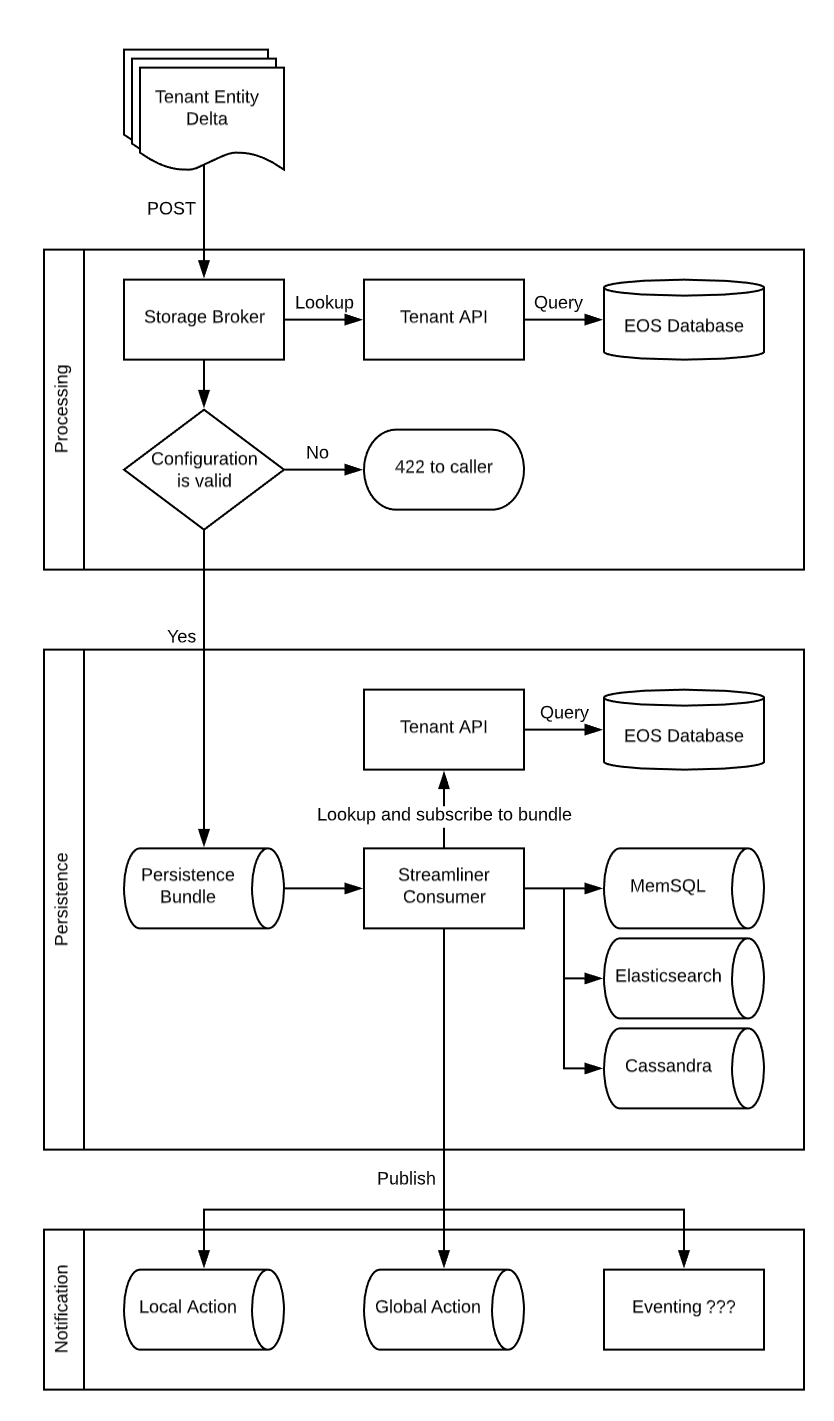
Data Persistence Flow
Processing
Delta envelopes sent to the storage broker enter in the processing stage. The delta will undergo the following validations and changes.
- Lookup the Entity configuration from the tenant API
- Perform validation
- Ensure the tenant has an entity with the provided key
- Locate the appropriate persistence topic for the provided entity
- Ensure that the provided user/role combination has sufficient permission
- Apply permission restrictions to the delta payload
- Ensure any sensitive or critical data has been encrypted
Notification
Once successfully persisted, a message enters the notification stage. If no notification methods have been configured for the entity, this stage will be skipped.
Action Topics
A tenant may request action topics in order to receive notification of updates performed. Action topics are unique to a single entity and are optional. If requested, two action topics are created for each entity. The global action topic will receive each message after it is persisted, regardless of the message’s origin. The local action topic will only receive messages that have originated in the same data center as the topic, but is otherwise identical.
Updated over 2 years ago